Last update: Thu, Feb 9, 2017 at 2:21 AM.
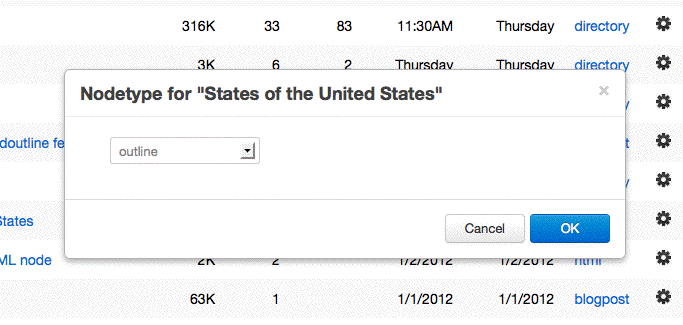
This has been a real interesting journey, but I'm getting pretty close. Thanks to Chuck Shotton for supplying key bits of information. I can now pop up a dialog, initialize elements in the dialog, and send a message back to the server when the user clicks OK. The dialog I'm working on to prove this stuff works is the (new) nodetype-setting dialog for the Roots page. But once it works, the same techniques should be hidden behind an interface in builtins.webApp.
A very importan concept I was missing was globals. Both global code and variables. Both are necessary to make something like this work. Up till now everything I had been doing in JavaScript has been done in handlers.
Later: I have the dialog working, mostly. It does what it's supposed to do, allows you to change the nodetype of an item in the Roots list, without having to go to the Prefs system. There's a ton of new stuff working.
But here are the problems:
1. I can only run the dialog once. If I try to set another root's type, the dialog doesn't show up. What this says to me is that there's something happening on the way out that kills the "page" as a script. I think this is so, because if I click the Cancel button, I can run another dialog.
2. I need to have the OK button refresh the page, so the new type shows up in the underlying list. I know the Ajaxy thing to do is to have just that one bit refresh, but I'd rather save that battle for another day, unless it's really easy.
I've turned comments on so that Chuck can respond here if he wants, or via email -- no diff to me.
Later: I tried adding
window.reload but that appears to have broken the app. Perhaps reloading the page somehow interferes with the request being made to set the nodetype on the server??
-
var myPopup = document.getElementById ("nodetypePopup");
var newtype = myPopup.options [myPopup.selectedIndex].text;
$('#nodetypeDialog').load('/ajax/setNodetype?type=' + newtype + '&root=' + rootUrl);
$('#nodetypeDialog').modal('hide');
window.location.reload ()
So I tried changing the order -- and doing the reload before calling the server. Apparently it's synchronous, the reload completes before the call to the server is made, so it reflects the old type. You have to manually reload it to get it to show the correct new type.
-
var myPopup = document.getElementById ("nodetypePopup");
var newtype = myPopup.options [myPopup.selectedIndex].text;
document.getElementById (rootViewTypeID).innerHTML = newtype;
$('#nodetypeDialog').load('/ajax/setNodetype?type=' + newtype + '&root=' + rootUrl);
$('#nodetypeDialog').modal('hide');
I've boldened the new bit.