Last update: Sat, Sep 3, 2011 at 11:20 AM.
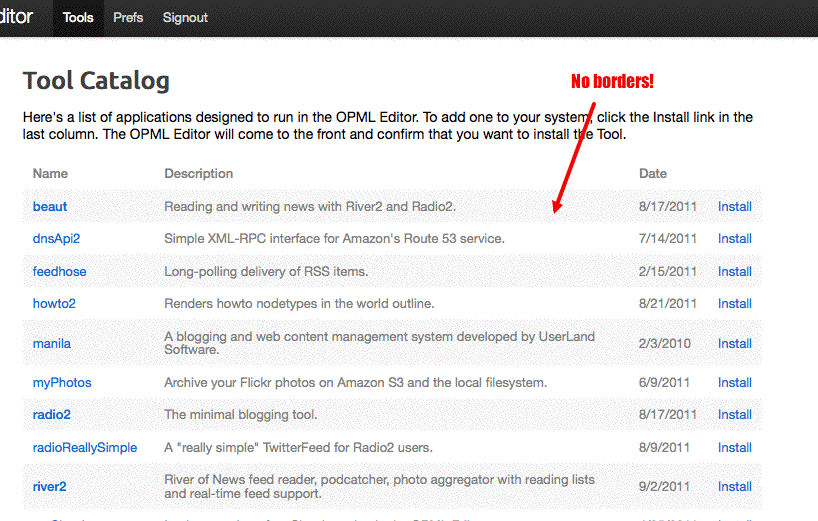
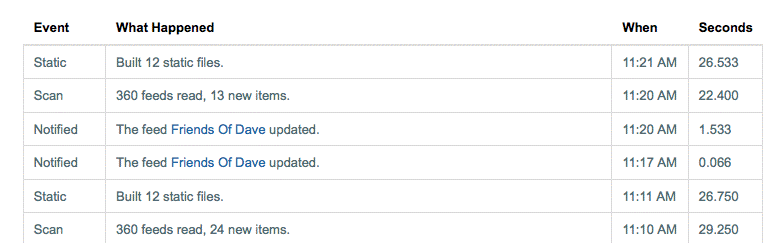
This is a good place to work, because the log page is something that appears in a lot of contexts, it's a table, and there's a very good model for what it should look like -- the Tool Catalog page.
Here are two screen shots:
Tool Catalog and
Log taken right now. The goal is to get the latter to look like the former.
1. log2.view -- Numerous changes, explained in the comment at the head of the script.
2. river2website.log -- Connected the log table up with the webApp style sheet. Added a header and intro.
BTW, it's nice to spend a little time focused on the log page of an app. I never have time to do that. It's not a tight corner, so it's easy to make big improvements with more manageable breakage.
Also, in the river2 template, removed styles for UI components that are no longer present. navMenu, divPrefs table elements.
Still todo: The log page now works much better, but there's a border that shouldn't be there. Can't figure out how it got there. Maybe one of the CSS gurus can help me figure that out??
-
river2Suite.data.html.logPageIntro
webApp.data.logTableClass
log2.view
river2Website.log
river2Website.["#template"]